Switching to one of the best ergonomic travel mice for digital nomads is one of the simplest ways to avoid wrist strain on the road.
Some links in this article earn us a small commission at no extra cost to you. As an Amazon Associate we earn from qualifying purchases.
This guide is written by a financial consultant who has worked full-time across 11 countries including Australia, the UK, Germany, the Philippines, and Japan. Every mouse on this list has been assessed against real remote work usage including long spreadsheet sessions, client presentations, and full working days from hotel rooms, coworking spaces, and serviced apartments across Asia and Europe.
Please verify current prices on Amazon before purchasing as prices fluctuate regularly.
Quick Picks
OUR PICK
Logitech MX Anywhere 3S
Best Overall
~$60 on Amazon
BUDGET PICK
Anker Vertical Ergonomic Mouse
Best Budget Vertical
~$30 on Amazon
PREMIUM PICK
Logitech MX Master 3S
Best for Power Users
~$100 on Amazon
| Mouse | Connectivity | Battery | Weight | Best For | Price |
|---|---|---|---|---|---|
| Logitech MX Anywhere 3S | Bluetooth + USB | 70 days | 99g | Best Overall | ~$60 |
| Logitech MX Master 3S | Bluetooth + USB | 70 days | 141g | Best for Power Users | ~$100 |
| Microsoft Arc Mouse | Bluetooth | 6 months | 87g | Best Ultra-Compact | ~$80 |
| Logitech MX Vertical | Bluetooth + USB | 4 months | 135g | Best Vertical Ergonomic | ~$100 |
| Razer Pro Click Mini | Bluetooth + 2.4GHz | 725 hours | 106g | Best for Quiet Spaces | ~$70 |
| Anker Vertical Ergonomic Mouse | 2.4GHz USB | 18 months | 145g | Best Budget Vertical | ~$30 |
| Logitech M720 Triathlon | Bluetooth + USB | 24 months | 135g | Best Multi-Device | ~$70 |
Your laptop trackpad was not designed for eight-hour working days. It was designed for occasional navigation between longer keyboard sessions. When you use it as your primary input device across full remote work days at café tables, hotel rooms, and coworking spaces, the cumulative strain on your wrist, forearm, and shoulder builds quietly over weeks and months before manifesting as the kind of chronic discomfort that affects your focus, your sleep, and eventually your ability to work at all.
The connection between physical comfort and mental output is direct and undeniable. An ergonomic mouse is designed to fit the natural contour of your hand, reducing the muscle strain and awkward wrist angles that lead to repetitive strain injuries. For a nomad whose office changes daily, this is more than just a creature comfort. It is the difference between a sustainable working life on the road and one that eventually forces you back to a fixed desk.
A good travel mouse weighs almost nothing in your bag, connects instantly via Bluetooth with no dongle required, lasts weeks on a single charge, and keeps your wrist in a natural position across the longest working days. The difference between a trackpad and a proper ergonomic mouse for serious remote work is not marginal. It is the difference between arriving at the end of a working day with energy remaining and arriving with your forearm aching and your focus depleted.
We have cross-referenced the most credible independent mouse reviews from 2026, verified Amazon.com availability for every product, and filtered for mice that genuinely deliver for the specific demands of working nomad travel rather than static home office setups.
These are the 7 best ergonomic travel mice for digital nomads in 2026, all confirmed available on Amazon.com and all worth the space they take up in your tech pouch.
1. Logitech MX Anywhere 3S — Best Overall
~$60 on Amazon

The Logitech MX Anywhere 3S is the mouse that experienced nomads consistently point to when someone asks what they actually travel with, and after spending time with it the reasons become immediately obvious. The Darkfield sensor tracks reliably on any surface including glass café tables, glossy hotel desks, and polished coworking surfaces without requiring a mousepad which eliminates one more item from your pack. The MagSpeed scroll wheel moves through long documents and spreadsheets at a pace that genuinely changes how fast you work. Bluetooth multi-device pairing handles three devices simultaneously with seamless switching between your laptop, tablet, and phone via a single button press. The USB-C charging means you use the same cable as your laptop and the 70-day battery life means you genuinely forget about charging it across weeks of travel. At 99 grams it weighs less than most smartphones and disappears into the corner of any tech pouch. For nomads who work from cafes with glass tables, hotel desks, and coworking spaces with every possible surface type, the MX Anywhere 3S is the single most practical ergonomic travel mouse available at this price point.
This is the mouse for nomads who want the best combination of portability, ergonomics, and professional features in a single compact package.
2. Logitech MX Master 3S — Best for Power Users
~$100 on Amazon

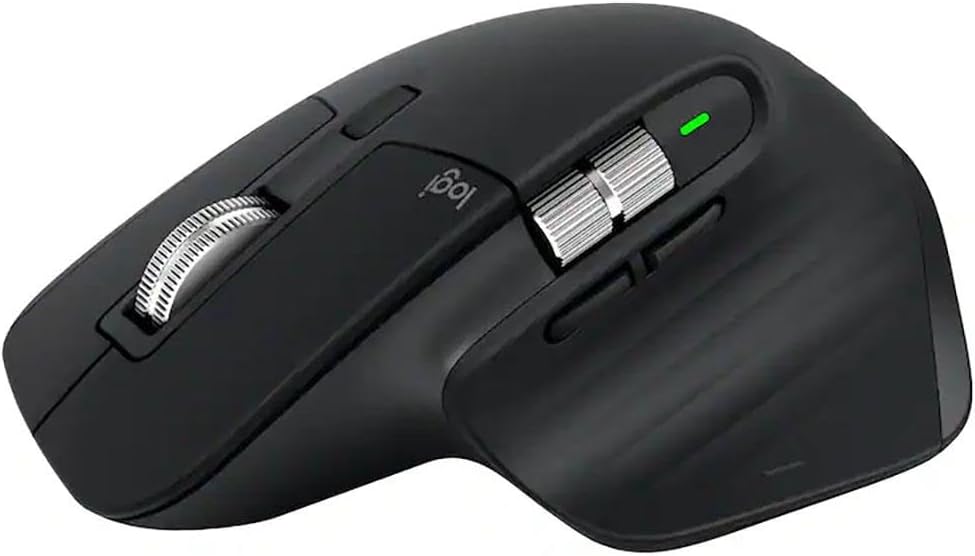
The MX Master 3S is the mouse that power users on the road keep coming back to, and the feature set explains why. The sculpted right-handed shape fills your entire palm with a dedicated thumb rest that drastically reduces forearm strain during intensive working sessions compared to compact flat mice. The horizontal scroll wheel at your thumb is a feature that sounds minor until you spend a week scrolling sideways through wide financial models or video editing timelines and realise how much time it saves. The MagSpeed vertical wheel accelerates through long documents in a single flick. The glass-tracking Darkfield sensor works on any surface without a mousepad. Multi-device pairing handles three devices simultaneously. The honest trade-off is size. At 141 grams and two inches of height it is noticeably larger than the MX Anywhere 3S and will create a visible bulge in a slim laptop bag. For nomads who establish longer bases of a week or more and work intensive full-day sessions, the ergonomic superiority of the Master 3S justifies the extra bulk every time.
This is the mouse for nomads who do intensive full-day sessions and want the most ergonomically capable mouse available in a travel-viable package.
3. Microsoft Arc Mouse — Best Ultra-Compact
~$80 on Amazon

The Microsoft Arc Mouse solves the packing problem that most ergonomic mice never address. When not in use it lays completely flat at roughly the thickness of a pencil, sliding easily into the slimmest laptop sleeve or tech pouch without adding any meaningful bulk. When you are ready to work, you simply bend it in half and it snaps into a curved shape that fits your hand naturally and positions your wrist in a more neutral arch than any flat travel mouse can manage. This snap-flat storage mechanism is genuinely the most intelligent packing design in the travel mouse category and makes the Arc the most packable ergonomic option on this list. The Bluetooth connection requires no dongle. The six-month battery life means you almost never think about power. The touch-based scroll mechanism replaces the traditional wheel with a gesture surface that takes a few days to adjust to but becomes natural quickly. For minimalist nomads who count every centimetre of bag space, the Arc is the only ergonomic mouse that genuinely disappears into the pack.
This is the mouse for minimalist nomads who want the most packable ergonomic option available and count every centimetre of bag space.
4. Logitech MX Vertical — Best Vertical Ergonomic
~$100 on Amazon

The Logitech MX Vertical is the most ergonomically distinctive mouse on this list and the one that generates the strongest responses from nomads who switch to it. The vertical orientation places your hand in a natural handshake position rather than the flat pronated grip of a standard mouse, which eliminates the forearm rotation that is the primary cause of repetitive strain injury from extended mouse use. The adjustment period for new users is real and most people need three to five days before vertical mousing feels natural and automatic. But nomads who make the switch consistently report significant reductions in wrist and forearm fatigue across long working days, particularly those involving heavy spreadsheet and document work. The Darkfield sensor tracks on glass and any other surface without a mousepad. Multi-device Bluetooth connectivity handles three paired devices. USB-C charging keeps the cable count minimal. At $100 it is a genuine investment but for nomads whose wrists are already complaining, the MX Vertical is the most corrective option on this list.
This is the mouse for nomads who are experiencing wrist or forearm strain and want the most ergonomically corrective option on this list.
5. Razer Pro Click Mini — Best for Quiet Spaces
~$70 on Amazon

The Razer Pro Click Mini earns its place on this list by solving a problem that none of the Logitech options fully address: silent operation in shared quiet spaces. The mechanical switches are engineered to produce clicks that are essentially inaudible beyond your immediate workspace, which makes a meaningful difference in library work sessions, shared coworking spaces, back-of-room conference settings, and late-night hotel room work when the person in the next bed is asleep. Beyond the silence, the Pro Click Mini delivers genuinely professional specifications including a 12,000 DPI maximum sensor, seven programmable buttons, and both Bluetooth and 2.4GHz dongle connectivity for low-latency precision when needed. The compact right-handed ergonomic shape handles extended sessions with less fatigue than flat mice of equivalent size. The 725-hour battery life is the longest on this list by a considerable margin. For nomads who frequently work in environments where audible mouse clicks would be inconsiderate or disruptive, the Pro Click Mini is the only option that solves this problem without any compromise on performance.
This is the mouse for nomads who work frequently in shared quiet spaces and need professional-grade performance with completely silent operation.
6. Anker Vertical Ergonomic Mouse — Best Budget Vertical
~$30 on Amazon

The Anker Vertical Ergonomic Mouse exists for one specific purpose: giving nomads who are curious about vertical ergonomics a way to test the format without spending $100 to find out whether it works for them. At $30 it removes every financial barrier to trying the handshake grip position and the core ergonomic benefit of vertical mousing is fully present at this price point. Your forearm sits in a neutral rotation. The wrist pronation that causes repetitive strain injury is eliminated. The fundamental ergonomic advantage is real regardless of the price. The honest trade-offs are also real. The optical sensor is less precise than Logitech’s Darkfield and will struggle on glass and highly reflective surfaces. The build quality is noticeably more plasticky than premium options. Many configurations use AA batteries rather than USB-C charging. But for a nomad who is experiencing wrist discomfort and wants to confirm that vertical mousing actually addresses it before committing to the MX Vertical at $100, the Anker is the most sensible starting point on the market.
This is the mouse for budget-conscious nomads who want to test vertical ergonomics without a significant financial commitment.
7. Logitech M720 Triathlon — Best Multi-Device
~$70 on Amazon

The Logitech M720 Triathlon earns its name from its core design philosophy: one mouse that handles everything across all your devices simultaneously without friction. The Easy-Switch button on the side toggles instantly between three paired devices so you can move from your laptop to your tablet to your phone without reaching for a different mouse or navigating through Bluetooth settings. For nomads running a multi-device setup across a laptop, an iPad, and a phone, the time saved across a working day adds up to something genuinely meaningful. The ergonomic right-handed shape features a thumb rest and natural grip angle that handles long sessions without strain. The 24-month battery life powered by a single AA battery means you genuinely never think about charging it. The Darkfield sensor tracks on virtually any surface including glass. The scroll wheel tilts for horizontal scrolling which is useful for wide spreadsheets and document editing. At $70 it delivers multi-device connectivity, glass tracking, solid ergonomics, and a two-year battery in a single package that represents strong value.
This is the mouse for nomads who work across multiple devices simultaneously and want seamless one-button switching between all of them.
The Bottom Line
For most digital nomads the Logitech MX Anywhere 3S is the clear answer. It tracks on any surface, charges via USB-C, lasts 70 days on a single charge, weighs 99 grams, and delivers professional-grade ergonomics in a package that disappears into any bag. If you are experiencing wrist or forearm strain, the MX Vertical is the most corrective option or start with the Anker Vertical at $30 to test the format first. And if you work from quiet shared spaces regularly, the Razer Pro Click Mini’s silent switches make it the most considerate mouse on this list.
All seven mice are available on Amazon.com with fast shipping. Please verify current prices on Amazon before purchasing as prices fluctuate regularly.
Frequently Asked Questions
Do I really need a mouse if my laptop has a trackpad?
For short browsing sessions a trackpad is perfectly adequate. For full working days involving spreadsheets, document editing, presentations, and extended cursor work, a trackpad creates cumulative wrist and forearm strain that a proper ergonomic mouse eliminates. For digital nomads working eight or more hours daily, a mouse is not optional equipment. It is a health investment.
What is a vertical mouse and is it better?
A vertical mouse orients your hand in a natural handshake position rather than the flat pronated grip of a standard mouse. This eliminates the forearm rotation that causes most repetitive strain injuries from mouse use. Vertical mice require an adjustment period of three to five days but nomads who make the switch consistently report significant reductions in wrist and forearm fatigue over time.
Do I need a mousepad when travelling?
It depends on the mouse. Standard optical mice struggle on glass, glossy hotel desks, and highly reflective surfaces. Mice with Darkfield sensors like the MX Anywhere 3S and MX Master 3S track reliably on any surface including glass without a mousepad. If you want to travel without a mousepad choose a mouse with Darkfield sensor technology.
What is the difference between Bluetooth and USB dongle connectivity?
Bluetooth connects directly to your laptop without any additional hardware which is ideal for minimalist nomads who want fewer items to carry and lose. USB dongles provide a more stable lower-latency connection which matters more for gaming than for productivity work. For remote work purposes Bluetooth is usually sufficient and more convenient for travel.
How long should a travel mouse battery last?
For travel purposes aim for a minimum of 60 days on a single charge. Most of the mice on this list significantly exceed this. The M720 Triathlon at 24 months is the longest on the list. USB-C rechargeable mice like the MX Anywhere 3S are more convenient for travel as you charge from the same cable as your laptop rather than carrying spare batteries.
Is a heavier or lighter mouse better for ergonomics?
For travel, lighter is generally better for your bag. For ergonomics during extended sessions, weight preference is personal but most hand therapists recommend a mouse that feels stable without requiring you to grip it firmly to control it. The mice on this list range from 87 grams to 145 grams, all of which are well within the comfortable range for daily travel use.
Can I use these mice with both Mac and Windows?
Yes. All seven mice on this list are compatible with both macOS and Windows. The Logitech options also work with Linux and ChromeOS. Some advanced features like programmable buttons and scroll wheel customisation require the manufacturer’s companion app which is available for both Mac and Windows.
What DPI should I look for in a travel mouse?
For productivity and remote work, a DPI range of 400 to 4000 covers everything you need. Higher DPI settings move the cursor faster which is useful on larger external monitors. All seven mice on this list offer adjustable DPI within or well above this range. The Razer Pro Click Mini at 12,000 DPI maximum is overkill for productivity use but performs excellently at lower settings.
Prices and availability accurate at time of publishing. Please verify current prices on Amazon before purchasing. As an Amazon Associate we earn from qualifying purchases.
Related gear: The 6 Best Laptop Stands for Travel in 2026, 7 Best Portable Monitors for Digital Nomads in 2026, and The 5 Best Webcams for Remote Work Travel in 2026.
This guide is part of the Work Setup collection.
Leave a Reply